Site Header
ShopCreate a videoAI Video
Deviation Actions

Premium Download
496 Favourites


Promoted Deviations


Suggested Deviants


Suggested Collections


Badge Awards
Description
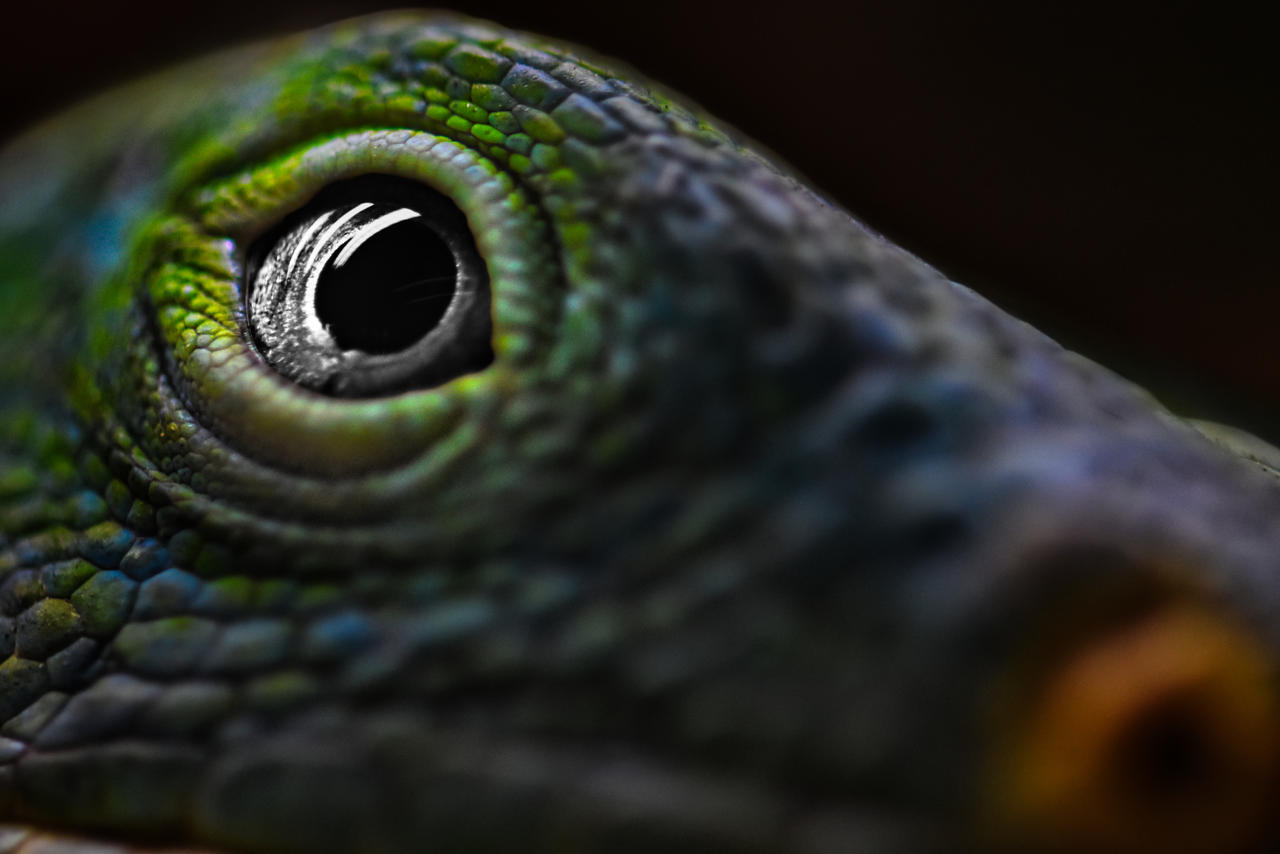
So for this edit i decided to try doing the opposite of what i have been doing for the eyes, instead of making the body greyscale and making the eye as colourful as possible i made the body as colourful as possible and made the eye greyscale. The eye is still the focus of the image so i did my best to make it highlighted as much as possible despite being in greyscale, the effect is a nice silver colour. Hopefully it will look even better when i reintroduce colour to the eye.
Editing Done:
1: As per usual i applied a general layer to the image, this time i wanted to keep most of the original colour. Some of the preset filters made the iguana appear more blue than the original green from the original photo. I wanted to be sure the colours were kept more in tact for the first edit at least. I then applied various mask layers afterwards
1a: the first mask was as per usual just for the background so i could really darken it without impacting the rest of the image.
1b: the second mask was for the entire animal excluding the eye so i could control the colours, focus, contrast etc.
1c: the third mask layer was for the eye itself so i can control the colour, focus, contrast etc just for the eye
1d: I added a fourth radial mask which was focused on the eye itself but only impacted the areas outside of the eye. This layer i used to exaggerate the blurring effect away from the eye and decrease the vibrancy away from the eye a little so that all the focus was on the eye at the center of the image.
1c: the third mask layer was for the eye itself so i can control the colour, focus, contrast etc just for the eye
1d: I added a fourth radial mask which was focused on the eye itself but only impacted the areas outside of the eye. This layer i used to exaggerate the blurring effect away from the eye and decrease the vibrancy away from the eye a little so that all the focus was on the eye at the center of the image.
1e: Similar to the last mask i added another radial mask for the eye but this time it effected anything at the center of the radial only, i used this to enhance the vibrancy only around the eye and slightly increase the 'focus' or rather used an AI to enhance the 'structure' just a tad.
Original Image

Image size
6000x4000px 19.71 MB
Make
NIKON CORPORATION
Model
NIKON D3400
Shutter Speed
1/250 second
Aperture
F/8.5
Focal Length
210 mm
ISO Speed
1600
Date Taken
May 1, 2021, 1:33:24 AM
© 2022 - 2026 TheBootesArtVoid
Comments35
Join the community to add your comment. Already a deviant? Log In
Face to face with the dragon! Awesome shot!