Site Header
ShopCreate a videoAI Video
Deviation Actions


Badge Awards
Description
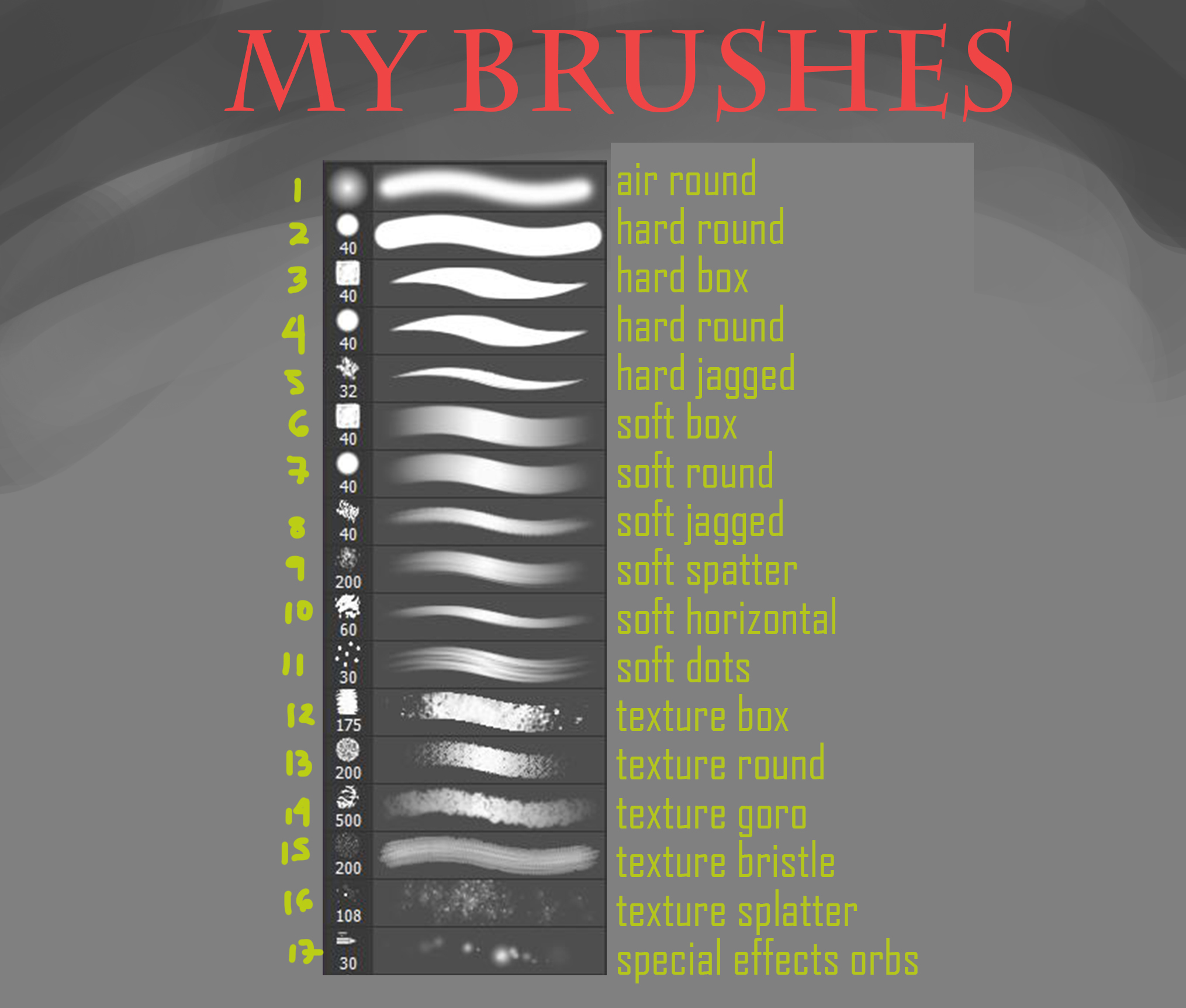
someone requested me to post my brush set in photoshop. adriahnmiguel
Here are the explanations of how I use each of the brushes.
1. air round
-I use this to soft blend colors as well as making the base color of my artwork
2. hard round
-this one is often my eraser brush. I use this as also in base coloring
3. hard box
4. hard round
5. hard jagged
-when working on lineart, I use these ones specially the jagged (chalk) since it gives a dynamic feel in my line work. The others are just for substitute in case I got bored of using the jagged.
6. soft box
7. soft round
- these are my blending brushes. soft box brush originated from cubebrush's bluefley brush www.youtube.com/watch?v=ZkV3Tf…
I just use whichever I feel like using between these two.
8. soft jagged
-nothing special, just the usual chalk brush. I use this in creating silhouettes of terrain, blending, etc.
9. soft spatter
-this was a gouache brush I guess and I tweaked it a bit to my preferences. Nothing special. Just a blending brush.
10. soft horizontal
-a brush I made. Just for blending as well.
11. soft dots
-I haven't use this yet but this was supposedly for painting hair strands.
12. texture box
-texture brush to build up the background of the canvas. Sometimes I use this to paint the character directly.
13. texture round
-brush that has the feel of a pastel on canvas. I don't use this much
14. texture goro
-brush I got from artist Goro Fujita's brush set. I use this in setting the background like texture box. And to hint some texture on some objects I paint
15. texture bristle
-I don't use this much. If I don't feel like using any of my soft brushes, I use this.
16. texture splatter
-The reason why I named it splatter, that, I don't know. XD One of loish's brush and she uses it for freckles. I use this for rock textures.
17. special effects orbs
-brush for the step "Add details". I use them in creating Bokeh feel. You can call this a "firefly" brush too.
Most of them are nothing special. Some are just default brushes like the soft round and hard round which I use the most.
© 2015 - 2026 Lalcimo
Comments7
Join the community to add your comment. Already a deviant? Log In
Thanks A LOT! I've been using Kyle T. Webster's Adobe Megapack and could not quite accomodate with the real oil ones... The blending was just not what I expected, so it took me hours to get closer (yet so far still) to where I wanted. So, I decided to go back to the basics but could not find a good chalk and soft edge square brush... until yours! It improved my workflow sooooo much! And the texture goro is great for blending and creating wet texture such as frog's skin, which I paint very often. There's nothing "nothing special" at all, but the reminder that it always starts with the basics